This note discusses Federico Boschetti's GNU Aspell dictionary for Ancient Greek. Boschetti is currently working at Perseus Project.
I have tested the dictionary and other files on Fedora 7. The dictionary contains the forms of the words from the Perseus corpus of texts; thus it works quite impressively ■.
The first program you need - on Fedora, Ubuntu or another GNU/Linux distribution - is GNU Aspell.
Download from www.himeros.eu the archives for the Ancient Greek Aspell Dictionary (both sources and compiled files). Currently, there are there three archives: the compiled form, the archive with the rws file and the archive with the sources (including the list of words).
In the future, Federico Boschetti inteds to put the files on Google Code.
Next you have to identify the location of the GNU Aspell library files. In Fedora 7, this is:
/usr/lib/aspell-0.60
First, I did - so to speak - a “minimalistic” installation of the files from Boschetti's archives. I copied from aspell6-agr-0.01-0.tar.bz2 (the archive with compiled files) the files agr.dat, agr.multi, u-agr.cmap and u-agr.cset into the above location. The archive aspell6-agr-0.02-0 has a similar structure.
You might want to rebuild the u-agr.cmap and u-agr.cset files. See the section about the charset ■ for the details.
Then, I have built from agr.wl (that you find in the source archive) the agr.rws file:
aspell --lang agr create master ./agr.rws < agr.wl
I have copied agr.rws in the same location. That's all!
For testing, I have created (with Vim) a small text file with a quotation from Archilochos. For spell checking, I have used the command:
aspell -l agr -c agr.txt
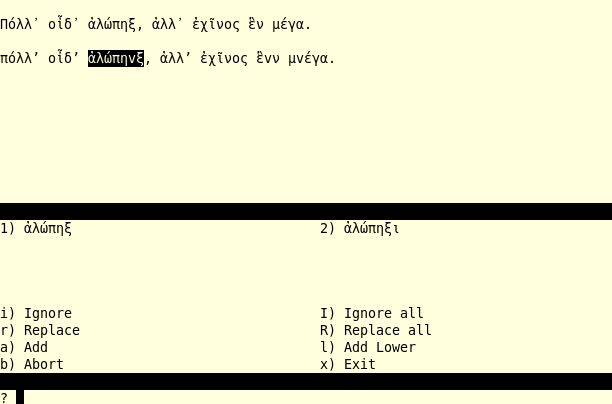
In the image you can see the result of the test. The first line is correct. The second line has mistakes. The mistakes were identified correctly.
Boschetti calls the charset used by his dictionary u-agr.
Is it possible to change the charset? Why would you do this?
An important sign in Ancient Greek is koronis. Sometimes, koronis is replaced with one of the elision marks. In version 0.02-0 of his source, Federico Boschetti uses the Unicode character with the hex number 2019 as elision mark (replacing koronis). This character is also on my keyboard at Shift+apostrophe-key. There are many candidates for the elision mark, so you have to check which one is used.
The elision mark causes error messages from Aspell. A solution is to replace the elision mark in your files, when it causes errors.
There is, however, another problem. Perseus texts use koronis (Unicode 1fbd) (see, for example, Aristophanes, Clouds or Plato's Apology).
Therefore it is interesting to have a look at the way of building the charset files.
First visit ftp.gnu.org/gnu/aspell/. Download aspell-lang (the current version is aspell-lang-20071024 ). Extract the content of aspell-lang in an empty folder.
Extract in another empty folder the files of the source of Boschetti's dictionary. I will call it the “agr-source”.
Now, you have to copy some files from aspell-lang to the agr-source. Copy from aspell-lang/maps the file ascii.txt to the folder maps in the agr-source.
Then copy from aspell-lang the file mkchardata to the agr-source.
Examine decomp.txt in its version from agr-source.

The highlighted line in decomp.txt has been changed. In Boschetti's version, it has 02BC = 1FBF. The hex number 1FBD is the Unicode number of koronis. Thus, I have made a change that will make possible the use of koronis.
Get a command-line in the folder with of the agr-source. Issue this command:
./mkchardata maps/u-agr.txt
In the agr-source, go to the maps folder. You have the new u-agr.cmap and u-agr.cset.
Then replace in agr.wl the elision mark with koronis.
Repeat the installation ■ procedure.
You can go to further tests, with texts using koronis.
Now you can test files with fragments from Perseus texts.
Copy fragments from Perseus texts and paste them in test-00.txt, test-01.txt and so on. Check with Aspell the files. Probably, there will be no error messages; the word list is generated from the vocabulary of the Perseus texts.
If you have the open-source version of Perseus on a computer, you may investigate the vocabulary of the Perseus texts. The Perseus interface offers you a word study tool. The open-source version has the xml sources of the texts and you can inspect them. Much more useful, in the open-source version, are the huge databases. You can use MySQL for the direct work with the databases.
Sometimes, you might get errors caused by koronis or the elision mark■. You may replace the koronis in your test file with a suitable elision mark or simply ignore the error messages. You may also try to rebuild the charset files■.
Sometimes, a word (from a Perseus text) might not be in the list. You have the possibility to add it to your personal dictionary. Press a when prompted by Aspell. Later, you may inspect the file .aspell.agr.pws (this is, at least under Fedora 7, the name of the file where Aspell keeps the list of added words).
In order to test the suggestions offered by Aspell, insert a mistake in a file and see what suggestions you get. However, users of Aspell, if they get a wrong suggestion from the speller, should remember that it is their responsibility to choose the right variant. (See also the section ■ on Aspell's suggestions.)
In Boschetti's dictionary, the word list is huge and raises an interesting practical problem. How can you search in it? You have to write the Ancient Greek word or fragment of word you are looking for. I will use a quick-and-dirty approach: a keyboard for Ancient Greek.
I use the Vim editor for searches.
In the normal mode of Vim, when you press the slash-key the editor moves the cursor to the last line and you may write the word or the word-pattern you are looking for.

May I use the composed characters in the searches? Unfortunately, you cannot. They might work sometime, sometime not.
The keyboard does not include all the precombined Ancient Greek characters. What is to be done?
You can use Vim's ability to insert Unicode characters.

Uppercase letters with accents and/or spirits are not on the keyboard. However, you can use Ctrl-v, in Vim's insert mode, followed by Shift+AltGr+v and the hex number 1f0c (f is on Shift+equal-key, the last key on the numeric row, c is on Shift-3-key). Thus you can check to see that Adonis is in the list.
On the sheet of paper with the keyboard map I keep a list with the Unicode hex numbers of the letters that I can insert only with Ctrl-v.
Of course, the idea is that the use of Ctrl-v is not too frequent.
Searches may reveal words that should not be on the list. The author, Federico Boschetti, is fixing errors still present in the alpha version.
The advantage of open-source is that you can adapt a program to your own aims. You also can experiment with modified sources. For all practical purposes, in this note, I refer to only one element in the source: the word list (the file agr.wl from the source archive).
Please also pay a lot of attention when you experiment with the script. Improper usage destroys data. They also may contain bugs. Thus you have to work with copies and test well on small example files, before working with the big ones. Do all the experiments in an initially empty folder.
The analysis proposed here uses text files, GNU Core Utilities and the SED editor. For SED see this tutorial.
In the first step, we prepare the list, encoding it in a special way. You have to encode the Greek letters in a way that is compatible with GNU core-utils.
The scheme used for encoding has the following general pattern:
axyza
In the scheme, the field a is for letters in the Latin alphabet. For Greek alpha we put a; for Greek beta we put b; for Greek gamma we put c and so on (for Greek omega we uses x). The Latin letters can be upper-case and lower-case.
The Latin letters bracket three fields with numbers. The field x is left empty for the moment (it always has a zero). The fields y and z have numerical values corresponding to Ancient Greek diacritical marks.
The 01-02 codes (on the yz fields) are for the spirits. The 03-05 codes are for accents. The 06 code stands for iota subscript. The codes 07-17 are for combinations of two diacritical marks. The codes 18-23 correspond to combinations of three diacritical marks (the last one being iota subscript). The code 26 is for a macro upon the letter. The code 27 is for a breve. The diaeresis and its combinations are coded between 30 and 33.
I also have used these numerical fields for special forms of the letters.
In order to convert a text file with precombined Unicode Greek text into this encoding I use SED.
 for the encoding with Latin letters and numbers of the Greek text. I have also included into the archive a Vim script which tries to convert combined Unicode to precombined Unicode.
Let us say that we have a short, three list word in a file named “test-agr.txt”. In a terminal, you have to issue the following command:
cat test-agr.txt | sed -f agr-code-num.sed > test-num.txt
You can see the result in the image.

Why this kind of encoding? Why not Betacode? Betacode is good when we want the text to be readable by a human. I will talk about Betacode later ■.
Now, this kind of encoding is “readable” by programs. You can use regular expressions for the detection of all sorts of patterns in the text.
In such a short list, as in the above example, we can even visually identify certain things. For example, in each word there is a 004 numerical sequence. This is the code for the acute accent.
Far more useful might be the identification of accent patterns. We may also study the structures of the words.
We can also eliminate words that appear twice in the list:

The idea is to use a pipe in which we encode and decode a list. In the middle, the stream is sorted. The key is the u option of GNU sort.
We may also apply the f option of GNU sort. This will fold upper-case and lower-case. Combined with the u option, this leads to the elimination of words which once start with an upper-case letter and once with a lower-case letter.
The most useful, however, application seems to me to be the calculation of frequencies. Let us say that you have converted agr.wl to a file agr-num.wl; for the calculation of the frequencies of the Greek characters, you have to use, in a command-line, the command:

The command uses pipes. It starts with the reading of the agr-num.wl file, then SED puts each code for a Greek letter on a separate line, then lines are sorted, then the command uniq retains only one distinct character and counts the number of similar characters in the file, then sort orders the frequencies. The result is stored in the file num-frq.txt.
For readability, we decode the file num-frq.txt:

Now we have a file with the number of occurrences of Greek letters in the list.
Caution! Do not try these commands on a slow machine. Even on a fast machine you need five, ten and even more minutes for these computations. Even an adjusted agr.wl has 22MB. The version encoded according to the scheme from this section has 50MB.
Why did I not use the file with Unicode Greek characters? I did. But sort, sed and uniq give a poor result. That is the reason for the use of the encoded version of the list.
As far as I know there are not many solutions for sorting Ancient Greek word lists. There is a note on the TLG site concerning sorting.
The aim is to sort the list in the dictionary order, the order that you find in Ancient Greek dictionaries. This would facilitate comparison with dictionaries for Ancient Greek.
Could we use for sorting the encodings with numerical fields bracketed by a Latin letter? No. GNU sort has an option for taking into account only alphanumeric characters, but this means that the digits in the encoding still count and the order is not that of a normal dictionary.
For sorting, we have to use an encoding which has on the three central fields non-numerical characters. The encoding is similar to that of the section ■ about the analysis of the list, but it replaces numbers with arrows (ten different types of arrows).
used for sorting.
The command used for sorting is:

This operation must be executed with great care. In fact, by using the non-alphanumeric characters in the encoding, only the bracketing Latin letters count. Thus we can only use options such as b and d for GNU sort. They tell the program to ignore blanks and sort in dictionary order.
Do not use the f or the u options of GNU sort in this case! You will lose for sure a lot of data, because diacritical marks are ignored.
You might need a quarter of an hour or even more, on a reasonably fast computer, when you sort a huge list.
It is not easy to inspect the list with Greek Unicode even when you use a large size of the font. Betacode is a far better solution when you want to be sure that the right spirit or the right accent is on a letter.
used for converted the list to Betacode and from Betacode to Unicode.
The scripts are used with this kind of command:

If you make changes in the list, in Betacode, then you have to go back to Unicode with the other SED script (unicode2beta.sed).
All the effort with the analysis and sorting makes sense if we compare the list of words with a classical dictionary, especially an analytical dictionary.
On the Internet Archive, you can find the Analytical Greek Lexicon. This is a dictionary focused on the grammar of Ancient Greek, published in 1852 by Bagster, in London. You can read it online or you can use the HTTP option and download the dictionary.
GNU Aspell also offers a possibility to play with the various forms of Ancient Greek words: the affix file.
The affix file has its own language. You can read the explanations for the OpenOffice affix files. The Aspell affix files have similar language. They use only different names for the files.
 a template affix file. I have also included a modified form of the agr.dat file.
The agr_affix.dat file includes a “TRY” line, with values based on the frequencies of Greek characters. See the section ■ above for the calculation of the frequencies. You can test and see if the frequencies increase the number of Aspell suggestions.
Another use of the affix file is for the study of the various forms of Ancient Greek words. The affix file includes two examples.

The affix file is in most cases generated by a program. This is useful for the compression of the list of words. I prefer, however, a manually written file for experiments with the forms of the words, as shown in the above example.
Aspell, when it finds an unknown word in the text, tries to make a number of suggestions. Aspell uses phonetic comparisons when it comes with the list of suggestions.
For the phonetic comparisons, Aspell must know how the word “soundslike” (see the agr.dat file). You may experiment with a specific phonetic file for a given language.
the archive with a phonetic file. You must install the agr_phonet.dat and the modified version of agr.dat together with the affix file from the affix archive.
You also must recompile the rws file and reinstall ■ it.
You must change the version line in agr_phonet.dat each time you make changes. This tells aspell to compile rws with the new version of the phonetic file.
I have included the phonetic file purely for experimental purposes. You may see in the screenshot the result of one of the experiments.
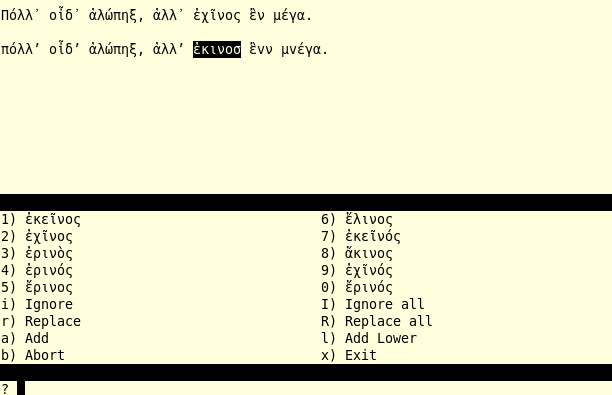
In the figure, on the second line, the fifth word (the word for hedgehog) has three mistakes. Aspell cannot know our intentions. It makes suggestions on the basis of the priorities in the phonetic file. In this case, the second suggestion is the good one.