Perseus is a digital library for those interested in the study of the humanities. I teach philosophy and the Perseus collection of classical Greek and Roman texts is an invaluable resource. You can read the texts from the Perseus digital library on the Internet.
The Perseus Project has an Open Source Release that one can install on the computer at home. I am not going to explain here the details of the installation. For this one should consult the documentation from the Perseus Open Source Release. I am only noting here the peculiarities of my own installation. I am sure that, in other conditions, there would be many other problems to solve, but I hope that my experience might be of some help.
You must assume responsibility for what you are doing! There is no explicit or implicit warranty in these notes. The context on your computer might be very different. Make all the chages step by step and check after each step the effects of the changes that you have made.
You should note that you must be prepared to spend some time installing Perseus. Installing all the needed programs and data might take at least three days (one day for Apache, Tomcat etc., another for data loading and the third for displaying the data). The installation requires some efforts, but Perseus is a very good program. Unfortunately, humanists might think that the installation is too complex for them. Well, it is not very simple, but one certainly can make it, without being a computer guru.
The notes follow the structure of INSTALLWITHDATA.html from the Open Source Perseus documentation. They do not repeat the text of the documentation; I have just noted what happened during the installation and how I solved the problems that I have encountered.
Well, for some people this might be the end of the installation process! You need a GNU/Linux system or Mac OS X for Perseus. Anyway, these notes concern a Fedora 9 GNU/Linux box.
"At present" means May 2008. My installation experience is from October 2008.
What about the hardware? I have used a separate system unit, with an Intel Motherboard DG35EC, a Dual-Core Processor and 2GB RAM memory. I have a 70GB partition for root (including usr, var and tmp).
The operating system that I have used is Fedora 9. I use this system unit for experiments, so a lot of things do not work perfectly on the unit. For details on how to set up supplementary units on a computer see my notes on Hardware for GNU/Linux. Obviously, you may install everything on your everyday working computer. I just wanted to observe that you do not need a whole new computer. In case you like to work under Windows, you just have to attach a new system unit to the computer. I do not recommend dual boot, since this means that you cannot work under both operating systems at the same time.
There is no access from the Internet to the local machine with Perseus on it; there is only access to the Internet from the machine. The system runs behind a firewalled router, but I have kept - for experimental reasons - an activated firewall on the system with Perseus. This should not create any problems with Perseus; the program is local. All this justifies the lack of concern, in what follows, for security problems.
One should take great care when working as root !!! You are on your own. You must make changes only if you understand very well what you are doing. Under GNU/Linux you are the only person responsible for the effects of the chages.
* * *
For Perseus you need Apache, Java, Ant, Tomcat5, MySql. With the exception of Java, I have used the rpm packages from Fedora 9. I have also installed the Java from Sun.
Install all the packages connected with Ant or Tomcat! For example, you will need, under Fedora, ant-trax. Of course, you will need ant-junit. If something does not work during the installation, check to see if you have all the packages you need on the computer.
Now, you have to set a series of environment variables. First, on a terminal, become root, using the su command. Then:
echo 'export JAVA_HOME=/usr/java/default' > /etc/profile.d/jdk.sh
echo 'export PATH=$JAVA_HOME/bin:$PATH' >> /etc/profile.d/jdk.sh
echo 'export ANT_HOME=/usr/share/ant' > /etc/profile.d/ant.sh
echo "export CATALINA_HOME=/usr/share/tomcat5" > /etc/profile.d/tomcat.sh
echo "export CATALINA_BASE=/var/lib/tomcat5" >> /etc/profile.d/tomcat.sh
echo "export CATALINA_OPTS=-server -Xms384M -Xmx512M -XX:MaxPermSize=256M" >> /etc/profile.d/environment
In the case of ant, I have also created a directory
mkdir /usr/share/ant/bin
and a link
ln -sf /usr/bin/ant /usr/share/ant/bin/ant
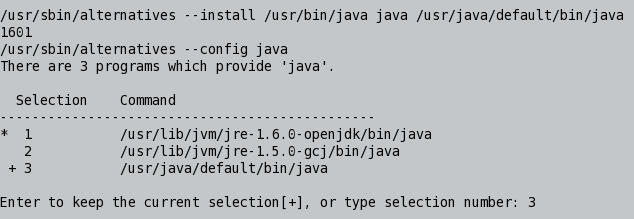
Java is rather tricky under Fedora 9. I ended up with three versions of Java. It seems that for Perseus you have to use JDK from Sun. I got errors with gcj. A solution is to use alternatives, as shown in the figure.
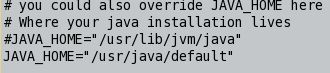
You also have to change Tomcat's configuration. I use the Vim editor:
gvim /etc/sysconfig/tomcat5
I changed the configuration as shown in the figure.
Make the same change in the configuration file in Tomcat's home, called CATALINA_HOME.
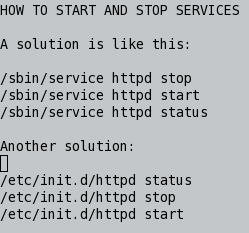
You will have to start and stop services repeatedly during installation (see an example, in the figure, in the case of Apache).
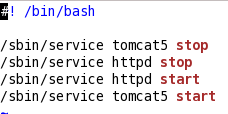
For restarting Apache and Tomcat, a solution is to use a small bash script (that only root can execute !), as shown in the figure.
There are a series of checks you may want to make. For example, check the Tomcat port, as shown in the figure.
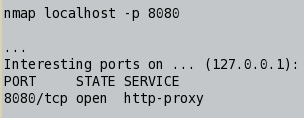
You may also want to check processes:
ps -eaf | grep tomcat
Tomcat5 has been the most frequent source of errors in my case. On the terminal, use the following command in order to see Tomcat's errors:
tail -99 /var/log/tomcat5/catalina.out
Alternatively, I have used gvim for reading the whole file. Check all the logs of Tomcat5 for other problems.
Use
http://localhost:8080
for reading Tomcat's documentation and for administration tasks.
Use
gvim /etc/tomcat5/tomcat-users.xml
for setting Tomcat's users and passwords.
In the case of MySql, I had a problem with the wait_timeout variable. Now, you may start mysqld as service in this way:
/sbin/service mysqld start --set-variable wait_timeout=172800
Another solution is to add to the [mysqld] section of /etc/my.cnf the following lines:
wait_timeout=172800
interactive_timeout=172800
Check (as root) with
mysqladmin -p variables
You need the -p option, if there is a mysql password set for root (as it is normal in a secure installation of MySql).
For a reason that escapes to me, changing only the first variable leaves its session value at the default level. Probably, that's why the Perseus documentation says "Login in to MySQL as root and type ...". No need for that if you change the /etc/my.cnf file in the way explained here.
I have tried both solutions for installing Perseus. Each of the solutions has its advantages and disadvantages.
Installing from scratch has the advantage that you can choose the collections you want to install. For example, I have installed only the classics. You also need less space on the hard disk in this case, but it still takes a lot of time to compile all that you need.
The solution that I have tried next is to install with data. This is much simpler and faster, but you need more space on the hard disk. How much? The /sgml has 12.6 GB and the MySql database for Perseus has 10 GB. The archives with data and programs take another 2 GB, but they are not kept on the disk. However, it seems prudent to have 25-30 GB of space on the disk only for Perseus. I have kept everything on the same partition (the temporary directory /tmp is also on this partition).
The /artarch and the /sgml directories are owned by root. Use
chown -R root:root *
to change ownership inside these directories.
On Fedora, thre is SELinux. Fix SELinux problems like this:
ls -alZ
chcon -v system_u:object_r:httpd_sys_content_t:s0 sgml
cd /sgml
chcon -R -v system_u:object_r:httpd_sys_content_t:s0 *
SELinux would not let Apache to open files, unless they have the appropriate SELinux context.
For reasons that are not entirely clear to me, in order to avoid the crash of Tomcat when Perseus searches for words in English, you have to let group and others access the index directory in this way:
chmod go+w /sgml
chmod go+w /sgml/reading
chmod go+w /sgml/reading/index
Tomcat creates the following directory in the index and needs appropriate rights:
drwxr-xr-x 2 tomcat tomcat ... greek.lexicon
The jar files are archives. You really have to copy them, as indicated in the documentation. I tried to use symbolic links, but the solution did not work.
You might have to copy more jar files than indicated in the documentation. I had to do this because of the peculiarities of the Fedora rpms. Change names when you copy jar files which indicate also the version. Eliminate the version numbers. For example, I had to copy ant-contrib.jar in its place in ANT_HOME.
There might be other problems, in a different installation, even in the case of Fedora 9. The solution is to read, as recommended in the Perseus documentation, the error logs and fix what has to be fixed. It's a question of judgment. The Perseus team has no possibility to guess all the peculiarities of GNU/Linux installations.
I tried to change as few settings as possible. That's why I have /sgml and /artarch (no symbolic links).
I have changed python.home and tomcat.home according to the specific of the Fedora 9 GNU/Linux distribution.
I have also added a java.home to the hopper.properties. The file build.xml uses the value of java.home. It might be useless, but it would make no harm:
java.home=/usr/java/default
was added to /sgml/reading/properties/hopper.properties .
Use
cd /sgml/reading/; grep -R java.home *
and other grep commands to see where the system uses java.home or any other item. This is the beauty of an open source program; you can check where and how it uses a certain command etc.
The work with MySql did not cause any major troubles.
In general, mysql needs a -p option, if there is a password for the respective user.
In some cases, it might be better to be prudent. I have used
FLUSH PRIVILEGES;
in mysql. For example, in the case of artarch, create the database and open it as root and use the commands:
grant all privileges on artarch.* to 'webuser'@'localhost' identified by 'webuser' with grant option;
FLUSH PRIVILEGES;
grant all privileges on artarch.* to 'webuser'@'localhost.localdomain' identified by 'webuser' with grant option;
FLUSH PRIVILEGES;
This is required when we make changes to the GRANT table.
The most important thing when you compile is to remember that you do not have to get scared by errors. Who is afraid by compiler errors? Windows users, I guess. They do not compile anything; they just transfer executables and the installation process is blind on Windows.
You have to read error messages and make a careful decision.
In my case at least, I had to fix some of the files from the distribution. This might not be needed in other cases, as one might use a different version of Java, Ant or Tomcat.
There was an error caused by non-escaped quotes. I think this was the first error (after ant dist jsp). A first case is in sgml:
gvim /sgml/reading/jsp/includes/index/indexNav.jsp
Another case is in artarch:
gvim /artarch/war/WEB-INF/jsp/includes/index/indexNav.jsp
Use gvim (or some other programmer's editor) to change and escape the quotes in the argument of getParameter:

Obviously, do not use editors such as OpenOffice or Abiword! Use Vim, Emacs or another programmer's editor.
I needed the following fix in /sgml/reading/buildFiles/common.xml:

Data loading should go smoothly. As for the estimated time with MySql, it was very different from the documentation in the case of
mysql -uwebuser -p sor < hib_frequencies.sql
which took seven hours on my computer.
Before
ant schema-export
Check whether you have servlet-api.jar in your tomcat common/lib directory. Copy it there from /sgml/reading/lib
I have just used the commands from the documentation. There was, however, a minor problem. In the documentation, the command
mysql -uwebuser - sor < hib_lang_abbrevs.sql (from INSTALLWITHDATA.html)
should take a -p option (the p is missing)
mysql -uwebuser -p sor < hib_lang_abbrevs.sql
This is the kind of problem that should cause no trouble. It is just a "typo" (that will probably disappear from the documentation in the future) and it is easy to correct the mistake. MySql issues a long message, but the problem is absolutely minor.
I just copied the processed xml files, as indicated in the documentation. I had to take care, however, of rights and SELinux context.
The strategy is the same as in the above section.
The observations are the same as in the two preceding sections.
The procedures indicated in the documentation work very well. However, I have adapted some of the indications to the conditions under Fedora 9.
I did not touch the stylesheets. I am no expert at all in the field.
I did adapt adapt some of the indications from the documentation to the conditions under Fedora 9 GNU/Linux.
In the case of Tomcat, I have created a hopper.xml file in /etc/tomcat5/Catalina/localhost. I put there the text that the documentation says one should put in server.xml of Tomcat. The idea is to make fewer chages in the main configuration file.
There might be a problem with artarch and tomcat logs. I have tried:
touch /var/log/tomcat5/artarch.log
chown tomcat:tomcat /var/log/tomcat5/artarch.log
For the configuration of Apache, first you may change directory (as root) to:
cd /etc/httpd/conf.d
Put localhost.conf (from the Perseus distribution) in /etc/httpd/conf.d
I included in the localhost.conf the text for mod_proxy
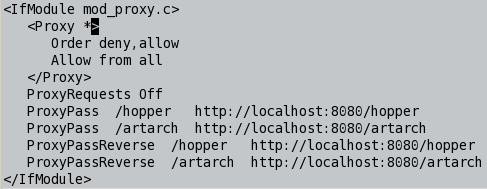
The documentation suggests to include the mod_proxy instructions into httpd.conf, which is the main configuration file of Apache, but I preferred to make changes in the configuration files from /etc/httpd/conf.d
Check httpd configuration problems with:
/usr/sbin/httpd -S
The changes in /var/www/html are indicated in the documentation. I suggest to follow them strictly and make any adjustments with care. I use index.html from the Perseus distribution as the index.html file in /var/www/html.
Well, after some work, Perseus functions on the local machine, as seen in the final image.
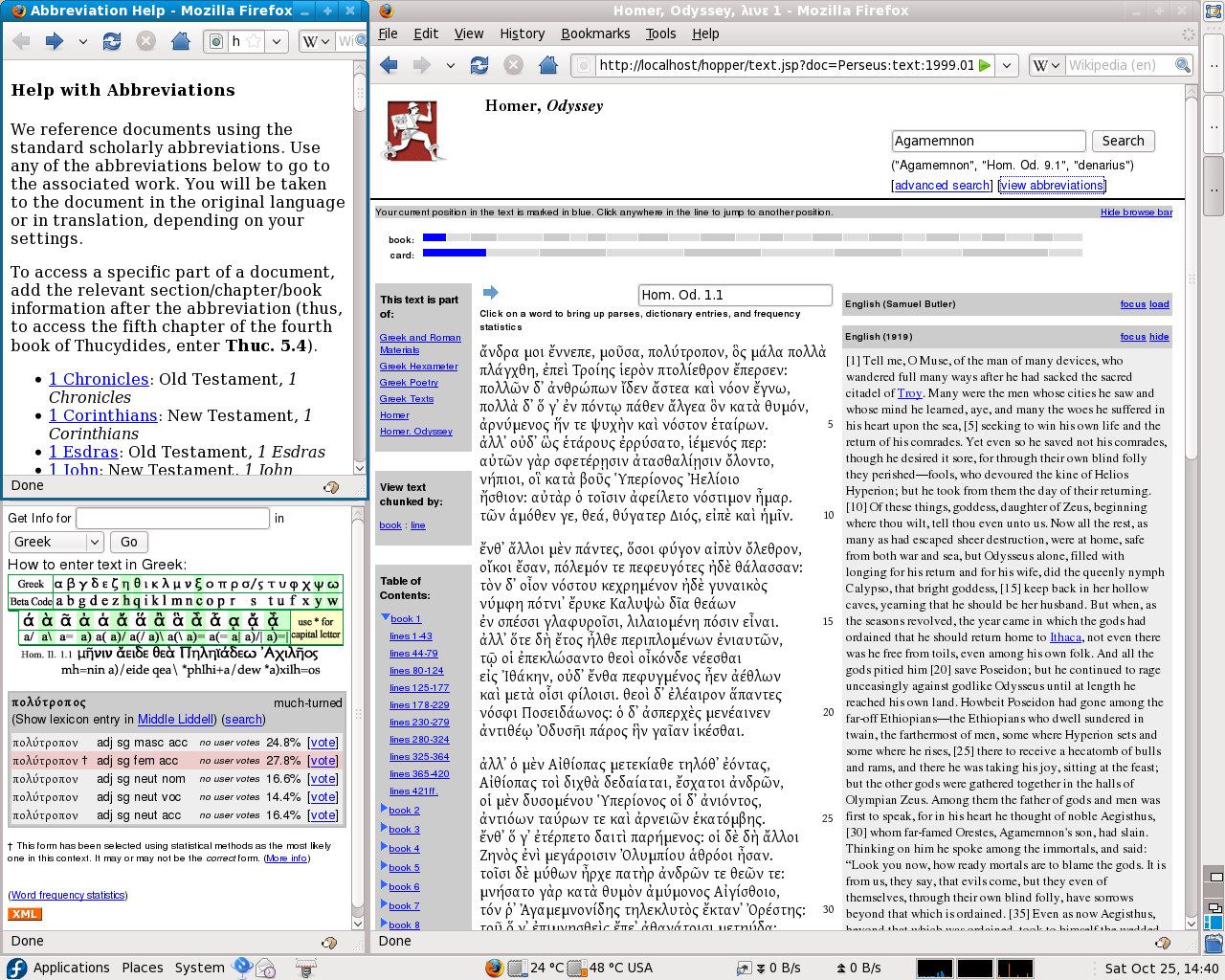
I used only Firefox for Perseus browsing. I have two versions of Firefox installed on the box: the native Fedora package and the latest version from the Firefox site.
One final observation: Beagle indexes the pages I consult from Perseus. Beagle is installed in Fedora 9. It functions as a local search engine.