If you have to write a paper, a book and many other documents, the best solution is TEX and friends. Among the friends, LATEX is a very good choice.
Why TEX ? Because it has a series of unique advantages:
Specifically, for humanistic computing, my choice is LATEX . It has serious advantages for humanists, because it is easier to use and install.
The aim of this note is to comment the installation on GNU/Linux. For the installation on Windows see my guide (in Romanian). Next, this note could be as simple as that:
Well, it is highly recommended to read those texts. I will comment however on specific problems for GNU/Linux.
GNU/Linux distributions might come with their own LATEX packages. For example, Fedora has RPMs for installing LATEX . I will describe here a solution which is both simpler and does not depend on RPMs or other specific GNU/Linux packages.
I suggest the use of TeXLive. Look for TeXLive on any CTAN mirror in the systems/texlive directory. In the case of Romania, for example, you can use the roedu mirror from Iaşi. You have to download the iso image and burn the CD with TeXLive.
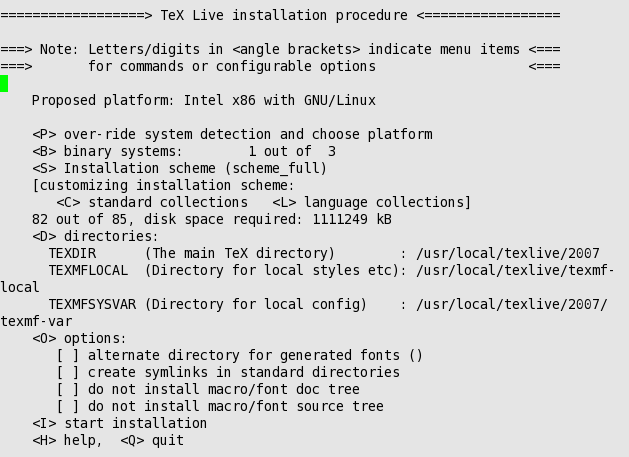
When you start the installation from the CD you will see a series of configurable parameters (as in the image).
Let's say that you are user snoopy. You can put the whole TeXLive in your home. Of course, you need enough space for this (at least 2GB). Press D and then 1. Change the TEXDIR value:
New value for TEXDIR [/usr/local/texlive/2007]: /home/snoopy/texlive/2007
Make sure that the other configuration values are OK. Enter command I and start installation. You will see a long series of messages during installation.
If everything ends well, then tell the system that where to find the important files of TeXLive. In the case of the Fedora distribution or a similar distribution, look in your home for the dot file named .bash_profile. Make changes similar to those in the “Change bash profile” image.

When you log in you should be able to invoke latex. Write a short test file like this. Open a terminal and run the command
latex ltx-test.tex
This works immediately with TeXLive 2007. The resulting dvi file has source specials in it. You may download a short movie in which I show how to get back from the dvi file to the source. You have to  in order to see the movie.
You can add your own files to TeXLive. Use the folder texmf-local. For example, snoopy could place in
/home/snoopy/texlive/2007/texmf-local/bibtex/bst/local
the files simple.bst andsimplu.bst.
Then one must run
mktexlsr
The TeXLive system is now able to manage the two new files.
Summing up, the installation of TeXLive is simple and leads immediately to high quality results.