This is a short description of a solution to a problem that occurs in various forms.
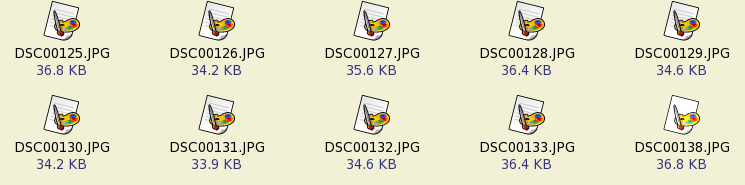
Let us say that we want to bundle pictures into an album. Like in Figure “The initial collection of images”, we have a series of photos taken with a mobile phone.
Now, the problem: is it possible to build an e-book (an album) out of this collection?
DjVu is a nice answer to the album problem. The same methods solve a similar problem in the case of e-books. Wikimedia Commons has media and a help related to DjVu files. The help shows how to use both commercial and GPLed tools for the creation of DjVu files. I will focus here only on GPLed resources.
DjVuLibre is the open source version of DjVu. One can download the sources and compile them. For example, I have downloaded djvulibre-3.5.19-1.src.rpm. There was no problem to build the rpm under Fedora 7.
I assume, that a similar procedure can be applied under other GNU/Linux distributions.
On the DjVuLibre site there are also binary packages for various platforms, including Windows and Mac. I have downloaded the binary package for Windows and I have installed it under Wine. It works. So, it should work very well under Windows XP too.
In Figure “The initial collection of images” the image files are already in jpeg format and this is the format we are going to use. In other situations, it might however be necessary to convert the files.
Conversions and other operations during the construction of the e-book are risky. Always back-up first the files and then work with them. Make, for example, an archive of the folder with images or create back-up copies.
The pictures have probably been named in a disorderly fashion. Let's think they are like the pages in a book. We have to rename them and put in order. We may rename them using a bash script.
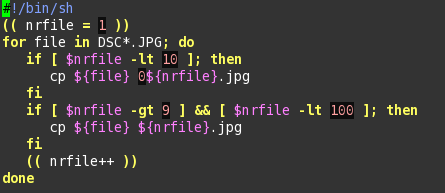
Test carefully a script like this one used for creating copies with new names. The script might destroy some files if you make a mistake.
If you don't understand the language of the bash scripts, use another method for changing the names of the files.
A cleaner, but more dangerous method, is to rename the files without making a copy.
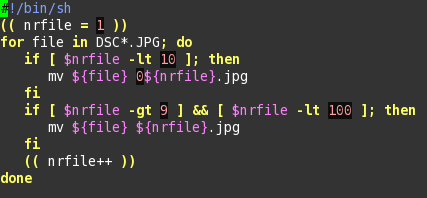
The rule is to test first the script on a sample and always keep a copy of the folder with images. We might, for example, make an archive of the folder with images. Then we may use a script like this one for renaming the files.
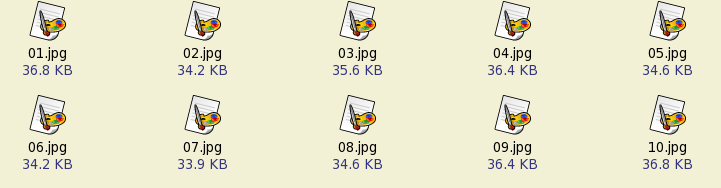
The result of the process of conversion, renaming and, probably, some rearrangement of the files is similar to what we see in the next figure.
There is a certain ambiguity in the idea of “djvu” format. This might mean simply the format of a compressed image file. The more general meaning is however that of a container for compressed images, text and other elements that make out of a djvu-file an excellent e-book.
In this section we talk only about the compression of the image files. The jpeg image is already compressed. It is however recommended to use a low compression ratio for the jpeg files. The c44 tool included in DjVuLibre produces a compressed djvu image.
In the command line, we may use simply a command like
c44 01.jpg
or a more sophisticated version (see the manual for the options of c44).
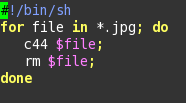
The above command may be repeated for all the jpg files with the help of a bash script.
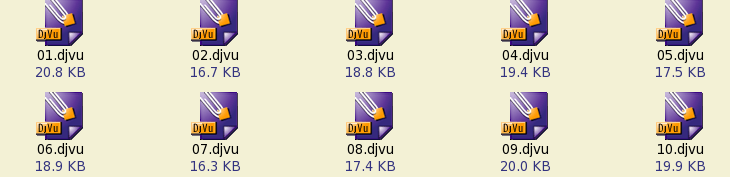
The result is a collection of djvu files.
In the final part we bundle the collection of djvu files into a single file.
For example, we may create with Gimp or another tool a cover for the album. We create it as a jpg file and convert it into a djvu file. Let's say that the name of the cover is “my-album.djvu” or simply 000.djvu, because you want this to be the first djvu file in the folder.
The command
djvm -c ebook.djvu *.djvu
bundles all the djvu files in the current folder into one file:
The key tool is djvm (read its manual for details).
For viewing, DjVuLibre includes the program DjView3 (different versions may have other numbers at the end of the name of the viewer; see the note on DjVu viewers).
In other situations we may have a collection of scanned pages. The procedures are however similar to the construction of the DjVu album.
On the Internet there are many images and scanned pages that you may want to bundle and view in a convenient fashion. DjVu is the best solution in the case of scanned pages because it compresses considerably the images and generates smaller files.
As we are going to explain in other notes, DjVu has other advantages, not only smaller dimensions of the files. It is considerably easier to repair the text layer and the outline in the case of DjVu files.